FM broadcast processor · AU · VST3 · Standalone Mac app · Intel & Apple Silicon · Free

TRANSMIT
TOWER

The sound of a radio station, without the transmitter.

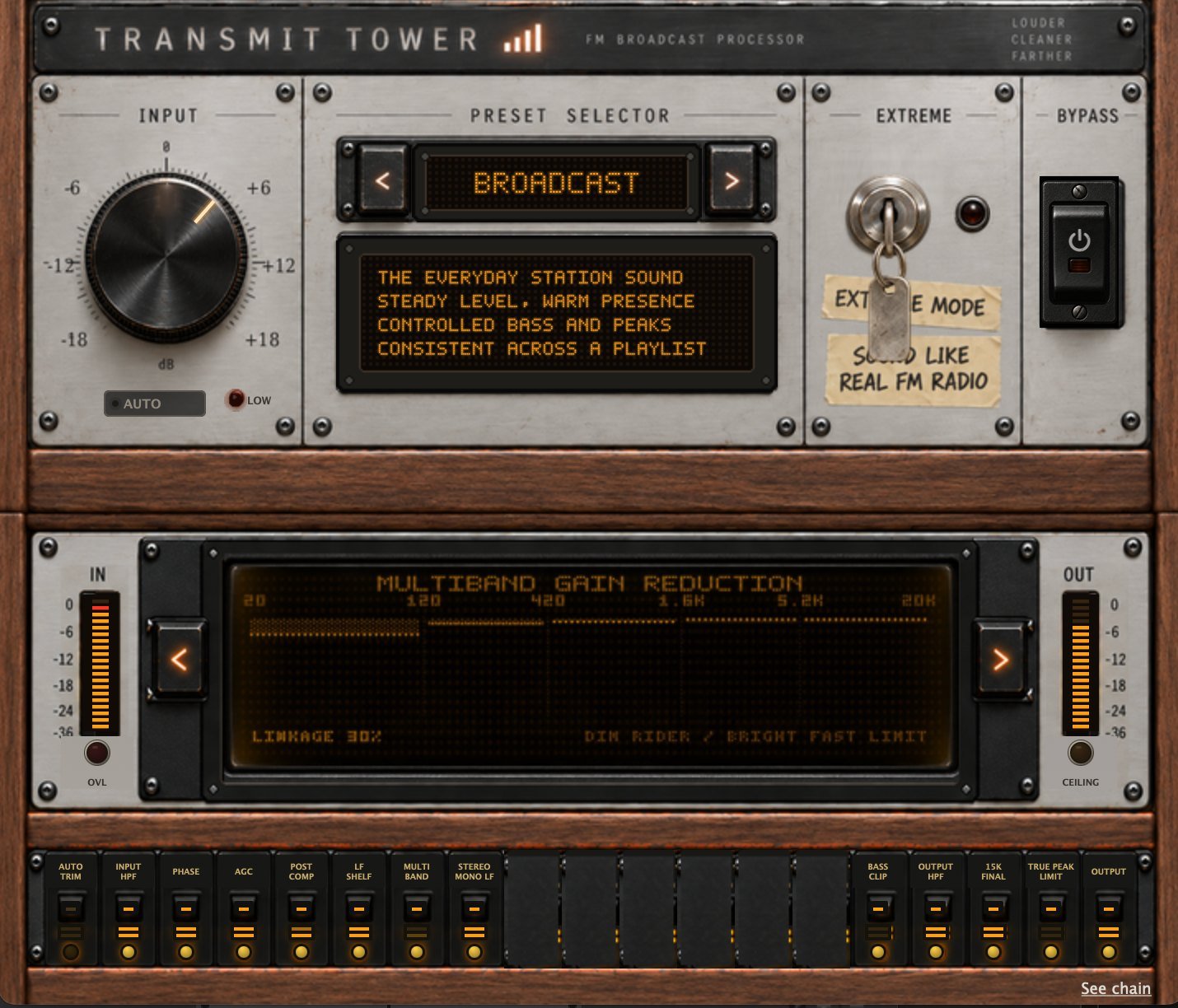
TRANSMIT Tower: input knob, preset selector on BROADCAST, EXTREME key switch, bypass, multiband gain reduction display and the stage rack

Nine presets, one input knob, and the whole broadcast chain underneath: level riding, five-band control, bass shaping, stereo work, clipping and final peak control. Pick a character and play a playlist through it.

  • Check how your mixes sound on real air, with EXTREME mode: the whole chain is in there.
  • Level a playlist for a prerecorded show or a DJ mix.
  • Process your web radio's studio stream live, with the standalone version.
  • Create punchy, loud, radio-ready jingles and station imaging.
Download TRANSMIT Tower
Read the wiki

Free for personal and commercial use. No warranty or support provided.

Radio stations don't sound the way they do by accident. Tower is that chain.

They sound that way because a chain of processing sits between the studio and the transmitter, and that chain has one job: make everything that goes out sound like it belongs to the same station, at the same level, no matter what it was, when it was made, or how it was mastered.

It is not an FM emulator: it does not add static, distortion or bad-reception artefacts to your signal. It simply mimics the chain that made FM radio sound the way it did throughout the years.

Why I built it Why build a plugin that wants to sound like a radio transmitter

I have a hobby that is closer to an obsession: audio processing for radio broadcast. FM radio is still widely used in Israel, and it may be the last analogue medium in daily use. I like the sound of it: the slightly narrowed bandwidth, the faint wash of noise underneath everything, the way a station has a character before a single song plays.

For more than a decade I've been the technical manager and a co-founder of KZradio, a web station in Tel Aviv. When we came back as an internet-only station, FM was still the badge of legitimacy. On FM we would have been a big fish in a small analogue pond; on the web we were plankton in an ocean. So we set out to prove we were a real station: proper language on air, a schedule anchored to the top of the hour, and an FM sound.

That sound isn't nostalgia, it's the answer to a specific problem. An FM station is heard in bad conditions by design: road noise, a weak signal, a cheap receiver. Against all of that it has to stay at one steady, comfortable level through a new single, a thirty-year-old master, a live announcer and a commercial, with no one touching a fader. The tools that solve that leave fingerprints, and those fingerprints are what people mean when they say a station sounds big.

A web station needs none of it. Honestly, a slow, gentle gain control would have done the job. I wanted more than it needed: multiband compression, low-frequency enhancement, stereo expansion over the top. Loud and proud. Then at a convention the chief engineer of a large FM station asked how we were getting such a big sound on a web stream, and I knew I'd got somewhere. I have since turned most of it back down. Listening changed, the constraints went away, and I got older and learned to respect the fact that different music wants to be different loudnesses.

TRANSMIT Tower is that whole argument, with a switch on it. The gentle end of the preset list is the station I run today. The aggressive end is the station I ran a decade ago. EXTREME is that younger version of me with the gloves off, because that character was never a side effect. It was the point.

Soon there will be no FM towers left in sight. But one thing doesn't change, and it's the only reason this plugin exists: we always want to sound better.

— Omer

Stage by stage, explained Six things it does to your programme

It levels

A slow automatic gain control keeps a thirty-year-old master and a new release at the same loudness, without anyone touching a fader. A second, faster compressor smooths what the first one is too slow to catch.

It splits the spectrum

Five bands — divided at 120 Hz, 420 Hz, 1.6 kHz and 5.2 kHz — each with its own slow gain riding and its own fast peak ceiling. A bass note stops ducking the vocal. How tightly the bands move together is part of the preset's character, and it ranges from completely independent to almost fully linked.

It shapes the low end

A level-dependent low boost adds weight when the programme is quiet and backs off when it isn't, so the bass stays big without turning to mud. A separate bass clipper keeps low-frequency peaks from stealing the headroom everything else needs.

It handles stereo

Width is added band-limited and boost-only, and it is gated by correlation — on out-of-phase or poorly correlated material, it declines to widen. Low frequencies are centred so the bottom end stays solid on any system.

It controls peaks

A clipper trims peaks rather than turning the whole signal down, then a true-peak limiter catches what's left.

And with EXTREME

It behaves like a transmitter: pre-emphasis, high-frequency limiting, clipping in the emphasised domain, then de-emphasis — the sequence that gives FM its particular forward, dense character, run for the sound rather than for the radio spectrum. It is not an FM emulator: it does not add static, distortion or bad-reception artefacts to your signal. It simply mimics the chain that made FM radio sound the way it did throughout the years.

One knob. INPUT, ±18 dB, and that's the only level control in the plugin. Everything else is the preset. There is no output gain, no threshold, no ratio, no band control — by design.

The nine presets Nine presets, from restraint to caricature

Presets don't just move a mix control — each one rewrites the whole chain: gain-control behaviour, compression, band linkage, tonal shaping, stereo, clipping, bandwidth and output ceiling. Some presets switch entire stages off.

Preset Character What it's doing
NATURALLow density, high dynamics, wideGentle level riding and heavily linked bands, so the spectrum moves as one. Barely any clipping and the widest bandwidth in the set. Bass clipper off.
BROADCASTMedium everythingThe everyday station sound. Steady level, moderate band independence, controlled peaks. This is the default.
DENSEHigh density, low dynamics, focusedA high-ratio gain control with a slow recovery, almost fully independent bands, and firm clipping. Consistency over movement, and a deliberately narrower image.
HOTVery high density, low dynamics, wideLouder and faster, a higher target level, strong band control, heavy bass shaping and the most clipper drive in the set.
IMPACTHigh density, medium dynamics, standard widthFully independent bands — no linkage at all — so each part of the spectrum fights its own fight. Punchy and immediate. Stereo width is left flat on purpose.
CLASSIC HITSMedium density, medium dynamics, wideBuilt for older material: adds body, keeps brittle upper-mid energy in check, and rides level gently so period-correct dynamics survive.
DANCEVery high density, low dynamics, wideThe most aggressive preset. Deepest bass shaping, fastest compression, most stereo width, hardest bass clipping and the highest output ceiling.
TALKHigh density, low dynamics, monoSpeech-focused. The heaviest rumble filtering in the set, low frequencies centred high up, fast compression for intelligibility, and no widening — voice stays where it belongs.
CLASSICALLow density, very high dynamics, naturalThe restraint preset. Its gain control can only turn things down, never lift a quiet passage; the post compressor and bass clipper are switched off entirely, and the clipper attenuates instead of driving. The most conservative output ceiling in the set.

Each preset's character, band linkage and crossover points are shown live on the instrument display.

EXTREME Mode and Automatic input control The two magic switches

EXTREME takes the preset you've chosen and pushes it toward the transmitter.

It engages a 15 kHz pre-filter, adds mild phase conditioning, applies a 50 µs pre-emphasis curve, limits the high frequencies that curve exposes, drives the clipper harder, then restores the tone with the complementary de-emphasis. The final bandwidth comes down to about 15 kHz.

That sequence — brighten, limit, clip, un-brighten — is the specific reason FM sounds like FM. Clipping in the emphasised domain means the clipper spends its effort where the emphasis put the energy, and the de-emphasis afterwards restores the tonal balance while leaving the density behind.

With EXTREME off, the six FM positions in the lower rack become empty spacers: 15K PRE, FM PHASE, PRE EMPH, HF LIMIT, FM CLIP and DE EMPH. Switch EXTREME on and they return in the same places with your settings intact.

One honest note: the spacers describe which controls are available, not which processing is happening. Tower still clips, still shapes bass and still band-limits its output in normal mode — the preset decides how much. EXTREME adds drive on top of that; it doesn't switch clipping on.

AUTO INPUT sets your gain structure, not your programme.

The AGC handles the programme: it raises quiet passages and lowers loud ones to keep a playlist even. AUTO INPUT sits in front of it and watches it. If the AGC is constantly pulling several dB out of the signal, AUTO INPUT slowly lowers the input. If the AGC is constantly adding gain, it slowly raises it. The goal is to leave the AGC sitting near the middle of its range, where it has room to work in both directions.

What it targets is about 0 dB of AGC correction — not a 0 dB knob position, and not a signal peaking at 0 dBFS. A settled input of −7 dB can be exactly right.

It can use the whole ±18 dB range, not a small window around where you left the knob, and it treats roughly ±1 dB of correction as centred and stops fussing. It comes down faster than it goes up, and it stops adjusting when the source drops below its low-level threshold. The display tells you whether it's SETTLING or LOCKED. Switch it off and it hands you the trim it arrived at, rather than snapping back to where you started.

Who it's for · what it isn't Do I need it?
Who it's for

Radio stations, on air and on the web

The original job: the processor between the studio and the output. Run it as the standalone Mac app on the playout machine, or last in the chain in your host, and let a mixed playlist come out sounding like one station.

Podcast and spoken word

The TALK preset is built for it: heavier rumble control, forward intelligibility, and no stereo widening at all.

Jingles, promos and station imaging

IMPACT exists for the thirty-second piece that has to land immediately.

Producers who want the radio sound on purpose

If you're making something that should sound like it came off the dial, that's what EXTREME is for.

What TRANSMIT Tower is not

Not a broadcast encoder. It doesn't stream, schedule, or transmit anything. It's a plugin in your host; what it makes is ordinary stereo audio.

Not a loudness-compliance tool. There is no LUFS target, no R128 or BS.412 meter, no automatic normalisation to a platform spec. Tower makes a sound; it does not certify a number.

Not a repair tool. It doesn't remove noise, hum, clicks or room. It will happily make all of those louder and more consistent.

Not a mastering limiter. There's a true-peak limiter at the end, but the density comes from the chain in front of it, not from the limiter.

Not subtle on every setting. Half the presets are deliberately aggressive. That's the point of them.

It doesn't loudness-match on bypass. A processed signal is denser and will usually sound louder than the unprocessed one even with both peaks under control. Trust your ears, not the A/B.

FAQ More questions?

Do I need this if I already run processing at the station?

No, and you probably shouldn't stack them. Tower is designed to be the chain, not a layer on top of one.

Where does it go in my signal path?

Last. It expects to see the finished programme.

Will it fix a quiet or badly mastered track?

It will level it, which is most of what you want. It won't repair it.

Does it do loudness normalisation for Spotify / YouTube / podcast platforms?

No. There's no LUFS target and no compliance meter. If you need to hit a number, measure it separately with industry standard tools.

What's the latency?

8 ms, fixed. Your host compensates automatically. If you monitor live through it you'll feel it slightly; if you're processing a stream, 8 ms is nothing.

Can I adjust the bands / thresholds / crossovers?

No. The only control that moves a level is INPUT. Everything else is the preset's job, which is the whole idea — the presets exist so you don't have to set forty things to get one sound.

Why is the input knob greyed out?

AUTO INPUT is on. It takes the knob over and moves it itself. Switch AUTO off to take manual control; it hands you the trim it had settled on.

Some stage switches don't seem to do anything.

On presets where a stage is already switched off — the bass clipper on NATURAL, TALK and CLASSICAL, for instance — the rack switch can't turn it back on. The preset has the final say.

Is EXTREME just "more"?

Not exactly. It's the FM signal path: pre-emphasis, HF limiting, clipping and de-emphasis. It's louder, but the character change is the point.

Mono or stereo?

Both, as long as the input and output layouts match.

Which hosts?

Any host taking Audio Unit or VST3 — Logic, Reaper, Cubase, Studio One, Ableton Live, Audition and the rest — plus a standalone Mac app for running it outside a DAW. Universal binary: Intel and Apple Silicon.